Free AI Image Generators in 2026: Limits, Watermarks and What to Check First
Six free AI image tools compared, using only what their official pages say
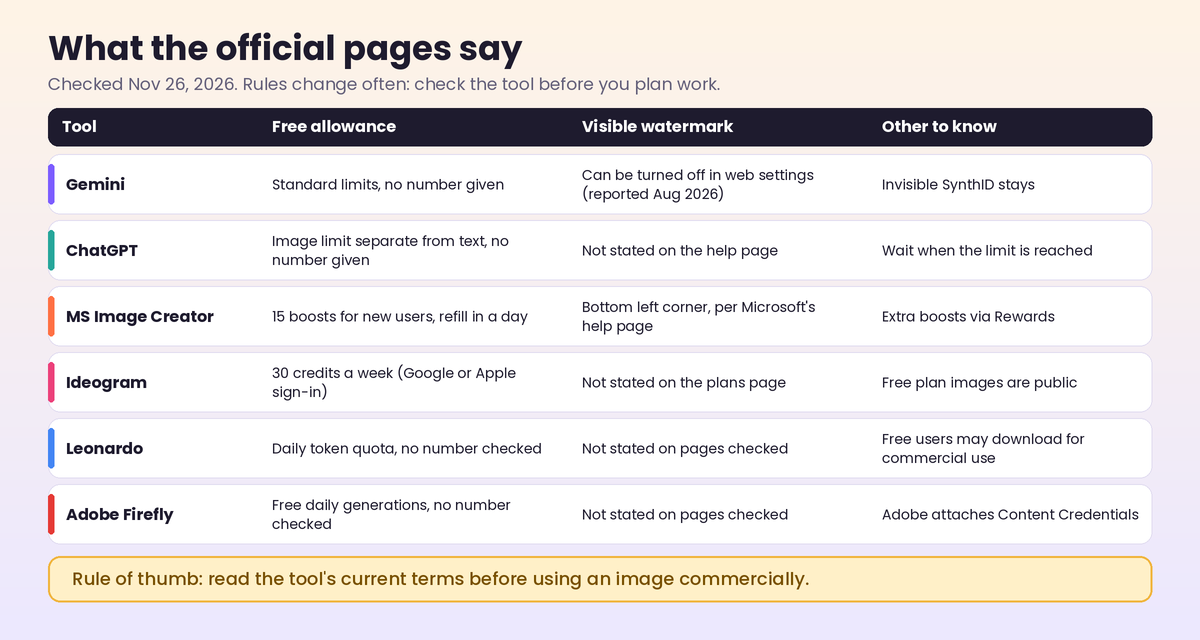
Most AI image tools let you try them for free, but the free plan is never "unlimited and without conditions". The rules differ from one tool to the next, and they change often. This guide compares six popular tools using their official help pages, and it says clearly when a number or a rule could not be confirmed.
The short answer
- There is no single best free tool. The right choice depends on whether you need many tries, text inside the image, or a clean file without a visible mark.
- A visible watermark is only one kind of mark. Several tools also add invisible markers or metadata that say an image is AI generated.
- Always read the current terms before you use an image for a business, a client or a product.
The six tools
Gemini (Nano Banana)
Google says free users get "standard limits" for Gemini Apps. The help page gives no fixed number of images. It explains that usage depends on how complex your prompt is, which models and features you use, and how long the chat is. The limit refreshes every 5 hours until you reach a weekly limit, and Google says limits may change. You can see your own limits in Settings, under Usage Limits.
On watermarks, Digital Trends and TechRadar reported in August 2026 that Gemini added a "Media watermark" setting that lets you turn off the visible mark on images made with Nano Banana. TechRadar describes it in the web settings and says it was not yet in the mobile apps. Work and school accounts do not get the setting, and the option is limited in some countries. The invisible SynthID watermark and C2PA metadata stay in the file in every case. We could not find this setting described on Google's own help pages, so check it in your account.
ChatGPT
OpenAI's free plan page says that image generation has its own usage limit, separate from text chat, and that you must wait when you reach it. OpenAI does not publish a number on that page. We did not find a statement about a visible watermark on the pages we checked, so we do not make a claim about it.
Microsoft Image Creator
Microsoft's help page says there is no waiting list or upfront cost, and that new users get 15 boosted generations. Boosts replenish in a day, and you can redeem Microsoft Rewards points for more. The same page says that a watermark appears in the bottom left corner of each image created with Image Creator. If you need a clean image, this is the tool to check first before you start.
Ideogram
Ideogram is often chosen when the image must contain readable text. Its plans page says free accounts get 30 credits each week if they signed up with Google or Apple, and credits reset every Saturday at 00:00 UTC. Accounts created with Microsoft or with an email and password get no free credits unless they link a Google or Apple sign-in. The number of images depends on the model and quality you choose. The same page says that on the free plan, everything you generate is public. That matters if the image is for a private project.
Leonardo
Leonardo's FAQ says the free tier includes a daily quota of tokens and has no expiry date. We could not confirm the exact daily number on the official pages we could open, so check the app. A Leonardo help article says free users can download their own generations for commercial use. The same article says paid users can switch on private mode, which suggests that free generations can be seen by other users.
Adobe Firefly
Adobe's Firefly plans page says the free plan includes a limited number of daily generations. Adobe says outputs from Firefly models are safe for commercial use, but the page does not say whether that applies to the free plan in the same way, so read the terms for your account. Adobe also says it attaches Content Credentials, which are provenance data that explain how a file was made. Adobe's help page on credits says free plan credits are allocated when you first use a Firefly feature, and they expire one month later.
A small checklist before you use an image
- Open the usage limits page of the tool today. Numbers in older articles, including ours, can be out of date.
- Look at the image corners. A visible mark can often be avoided by changing a setting or a plan, but you should not try to remove it with another tool if the terms forbid it.
- Check who can see your image. Some free plans make your generations public.
- Read the commercial use rule for your plan, not for the paid plans.
- Keep the prompt and the date. It helps if someone asks how an image was made.
- Say when an image is AI generated if it could be mistaken for a real photo.
What we could not confirm
- The exact daily token number of Leonardo's free plan.
- A visible watermark rule for ChatGPT, Ideogram and Adobe Firefly on their official pages.
- Whether Adobe's commercial use statement applies in the same way to free accounts.
- Gemini's watermark setting on Google's own help pages. We rely on press reports from August 2026.
Sources
- Gemini Apps limits and upgrades (Google)
- Gemini adds a toggle to disable AI watermarks (Digital Trends)
- Gemini now lets you turn off the visible watermark (TechRadar)
- ChatGPT free tier FAQ (OpenAI)
- What is Image Creator? (Microsoft)
- Ideogram available plans
- Leonardo FAQ and Leonardo plans help article
- Adobe Firefly plans FAQ and Adobe generative credits FAQ